How EventosJM works
From the feed to the vibe — four simple steps.
-
Discover
Browse Tonight, This weekend, Near you, and All — immersive posters first.
-
Save & Attend
Bookmark what you love and mark yourself going.
-
Show up
Food, event chat, streams, shuttles, highlights — tickets are just one piece.
-
Organize
Post any gathering — kids’ day to conference — then run campaigns, highlights, chat, and stats.
IN THE APP
Enable push notifications
Same path for everyone — organizers and attendees. Turn this on so EventosJM can alert you about events you care about, chat, and status updates.
Patrons get alerts for bookmarks, attendance, chat, and day-of "Still on?" updates. Organizers get alerts when people engage with their events, plus a morning-of reminder to tell guests it is still on.
-
Open Profile
In the EventosJM app, tap the Profile tab on the bottom navigation bar (last tab: Feed → Highlights → Bookmarks → Chat → Profile).
-
Open Account Settings
On Profile, tap Account Settings (in the same list as Your Profile and Help Center).
-
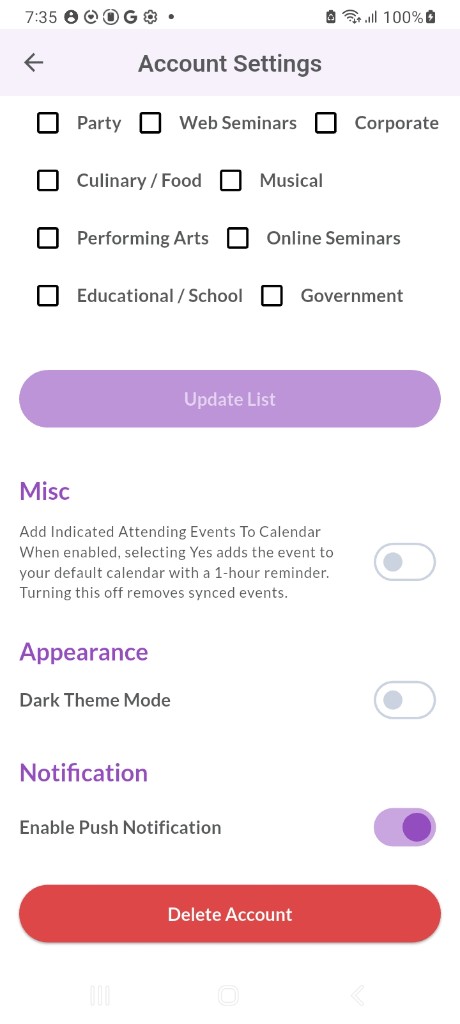
Turn on Enable Push Notification
Scroll to the Notification section and switch on Enable Push Notification. When your phone asks, tap Allow so alerts can appear.
If the switch will not stay on, open your phone’s system Settings → Apps → EventosJM → Notifications and allow notifications, then try the in-app switch again.